


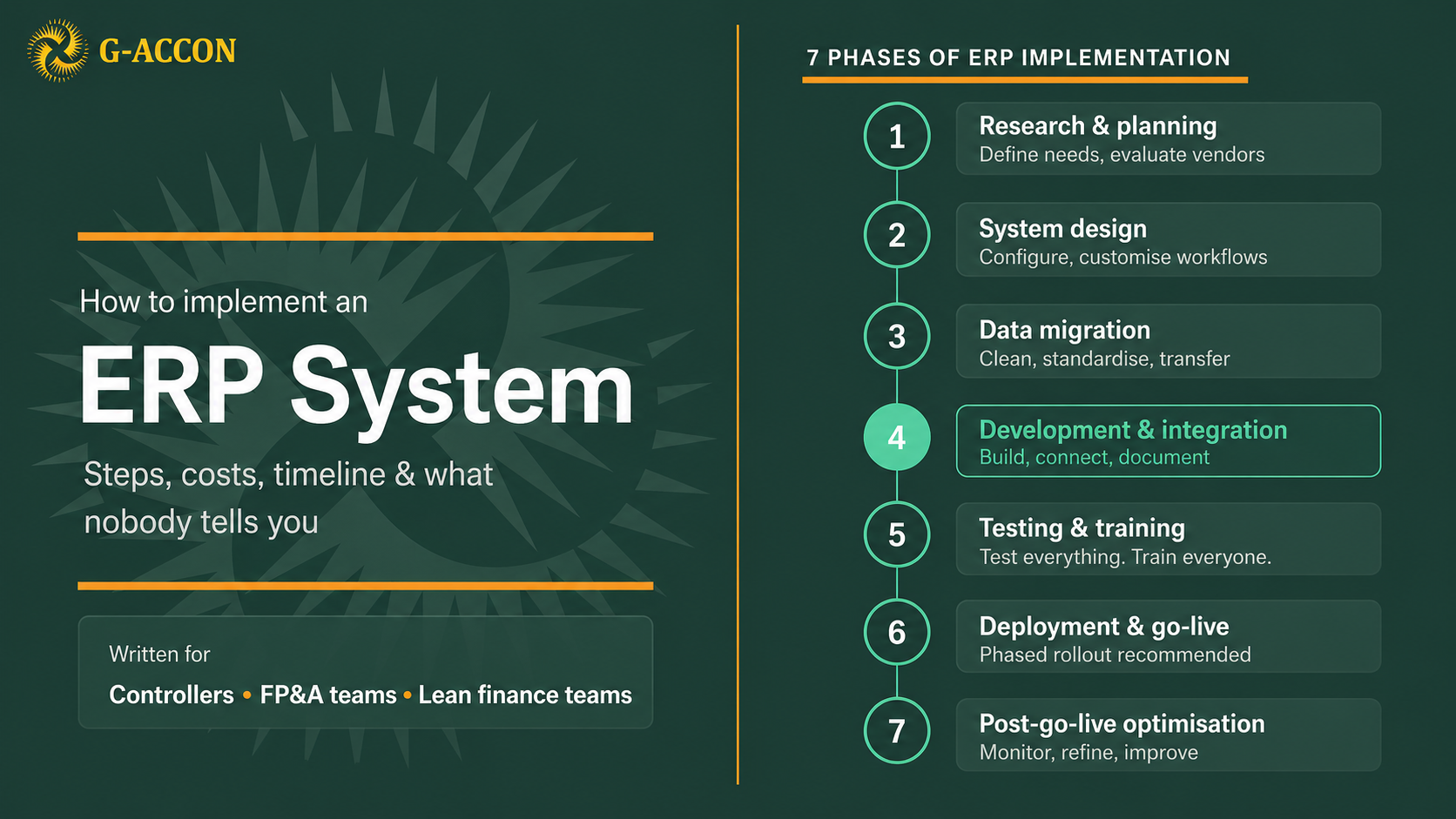
There’s a version of ERP implementation that lives in vendor decks: seven clean phases, a clear timeline, a go-live date everyone circles on the calendar, and a finance team that emerges on the other side with a single source of truth and a faster close.
Then there’s the version that actually happens.
Not that ERP implementation fails, it doesn’t, not always, and not for the reasons people assume. But for lean finance teams running a growing business with limited bandwidth, the gap between the slide and the reality is wide enough to derail even well-planned projects.
This guide closes that gap. It covers how ERP implementation actually works, what it costs in money and in time, what breaks most often, and the question you should answer honestly before you commit to any of it.
What is ERP implementation?
ERP implementation is the process of selecting, configuring, and deploying an Enterprise Resource Planning system, software that connects your core business functions (finance, inventory, procurement, HR, payroll) into one centralised platform with a shared database.
The goal is integration. Instead of your accounting system, inventory platform, and payroll tool each holding its own data and requiring someone to manually move information between them, an ERP creates one system of record.
Transactions update automatically across functions. Reporting pulls from a single source. The finance team stops spending a week every month assembling numbers from five different places.
When it works, it’s genuinely transformative. When it doesn’t, the reasons are almost always predictable, and almost always preventable.
How long does ERP implementation take?
This is the question everyone asks, and the honest answer is: longer than your vendor says.
For small and mid-sized businesses, realistic timelines look like this. A straightforward implementation with a single entity, limited customisation, and relatively clean data: four to six months from selection to go-live.
A more complex setup, multiple entities, significant data migration, integrations with existing tools, and custom reporting requirements, realistically runs eight to fourteen months, sometimes longer.
The phases that consistently expand beyond their initial estimates are data migration (almost always), user training (usually), and the period immediately after go-live when real-world usage reveals gaps that testing didn’t catch.
|
What doesn’t get talked about enough: the people managing the implementation are typically the same people running the day-to-day finance function. Your controller doesn’t stop closing the books during implementation. Your accountant doesn’t stop processing invoices. The ERP project sits on top of everything else, which means it moves at the pace of whatever capacity is left after the business is taken care of, which is often not much. |
How much does ERP implementation cost?
Licensing costs are the number vendors lead with. They’re also the number that tells you the least about what you’ll actually spend.
For small businesses, ERP licensing runs roughly $9,000 per user per year as a baseline, and that’s before any customisation, implementation services, or integration work. A three-person finance team can quickly reach $25,000 to $30,000 annually just in licensing, before a single consultant has been engaged.
Implementation services, the actual work of configuring, migrating, and deploying, add another layer. For a lean implementation with minimal customisation, expect $15,000 to $50,000 in professional services. Complex implementations with significant integration work routinely exceed $100,000.
The costs that don’t appear in proposals deserve their own attention. Scope creep is the first: the moment the implementation team gets into your actual data and workflows, requirements expand. Budget for a 20–30% contingency on implementation services as a matter of course.
Internal time is the second: every hour your controller spends in a requirements workshop is an hour not spent on their actual job. Extended support is the third: the first three to six months after go-live almost always require more support than the implementation contract covers. Budget for it explicitly.
The 7 phases of ERP implementation
Every ERP vendor will show you a roadmap with seven clean phases. Here is what each one actually involves, and where lean finance teams most often run into trouble.
ERP implementation roadmap
Seven phases, from planning to optimisation

Phase 1: Research and planning
Every ERP guide tells you to gather requirements, define KPIs, and evaluate vendors. That’s all correct. What they skip is the politics.
Getting meaningful input from every department affected by the new system requires those departments to stop what they’re doing and engage with a project they didn’t choose. Operations wants different things from finance. Sales wants different things from operations. And everyone has a mental model of the current process that doesn’t quite match how the process actually runs.
The teams that do this phase well spend time on requirements that feel obvious, and treat them as anything but. “How do you currently process invoices?” sounds like a simple question until the answers reveal six different workarounds that evolved over three years and now need to be mapped to a system that doesn’t know they exist.
|
Worth knowing: Define your success criteria before you talk to a single vendor. Write them down. Be specific: not “better reporting” but “the ability to close intercompany accounts and produce a consolidated P&L within three business days.” Then evaluate vendors against those criteria, not against their feature lists. |
Phase 2: System design and customisation
Once you’ve selected a system, configuration begins, and this is where the temptation to over-customise becomes a real problem.
Every ERP has a standard way of doing things. The pressure to replicate your current processes exactly, to make the new system behave like the old one, leads to customisations that are expensive to build, fragile when the vendor releases updates, and impossible to support when the person who built them leaves.
|
Worth knowing: Approach every customisation with a simple test: is this solving a genuine business need, or a familiarity problem? If the only reason you need it is “that’s how we’ve always done it,” that’s worth questioning seriously before you pay someone to build it. |
Phase 3: Data migration
Ask any experienced ERP consultant what phase derails the most implementations, and the answer is almost always data migration. Not because it’s technically complex, the tools are generally reliable, but because data quality problems that were invisible in the old system become very visible in the new one.
Historical financial data accumulated over years is almost never clean. You’ll find customer records duplicated under slightly different names, transactions coded to accounts that no longer exist, and date formats inconsistent across files imported from different sources.
|
The rule: clean before you migrate. Don’t bring problems from the old system into the new one, they’ll be harder to find once embedded in a new database structure, and they’ll undermine trust in the data at exactly the moment people are forming their first impressions of the system. Run a pilot migration on a representative sample first. Issues in a pilot are fixable in a few days. The same issues after a full migration can cost weeks. |
Phase 4: Development and integration
If your ERP needs to connect to other systems you’re keeping, a CRM, a payroll provider, an inventory platform, your reporting layer, integration work happens here.
Every integration is a dependency, and dependencies create failure points. When your CRM pushes data to your ERP and your ERP pushes to your reporting tool, a change to any one of these systems can break the chain.
Document every integration thoroughly: what data flows where, how frequently, what triggers it, what happens when it fails. Then test with realistic data volumes before go-live. An integration that works perfectly with 100 test records sometimes behaves very differently when it’s processing 10,000 real transactions.
Phase 5: Testing and user training
Testing is the phase that gets compressed when projects run late, which is to say, testing is almost always compressed. This is backwards.
A bug caught in testing takes an afternoon to resolve. The same bug caught after go-live means investigating why your Q3 revenue numbers don’t reconcile, running correction journals, rerunning reports, and explaining to leadership why the close took two extra days. Test everything. Test it again. Then have someone who wasn’t involved in building it test it too.
|
Worth knowing: User training is more than process training, it’s connection training. An AP clerk who understands how incorrect invoice coding flows through to the GL and ultimately the management reports will make different decisions than one who just knows which buttons to press. Designate power users within each department who receive deeper training and act as internal experts. |
Phase 6: Deployment and go-live
Two approaches: phased rollout (by department or function over several months) or big bang (everything live at once). For lean finance teams, phased rollout is almost always the right choice. It limits the blast radius of any problems that surface and lets you learn from early users before rolling out to everyone.
Expect the first month after go-live to be difficult regardless of how well the implementation went. Have a dedicated support process in place, a named person who fields questions and resolves issues quickly.
An unanswered question that turns into a workaround in the first weeks post-launch calcifies into a habit faster than you’d think. Keep parallel systems running for a defined period, the old system gives you a reference point when something looks wrong in the new one.
Phase 7: Post-go-live support and optimisation
The ERP is live. The implementation team hands over the keys. This is where many implementations quietly plateau rather than delivering on their full promise.
The first three months post-launch are the most important for long-term success. Users are forming habits. Workarounds that emerge in this period become entrenched quickly if nobody addresses them. Track the metrics you defined in Phase 1, not to report upward, but to understand what’s actually working.
Budget for system optimisation as an ongoing activity, not a one-time project phase. The teams that treat go-live as the end of the project extract a fraction of the value of those who treat it as the beginning.
Common ERP implementation mistakes that cause projects to fail
Underestimating data quality
Clean data is the foundation of a reliable ERP. Teams that rush migration bring their old problems into the new system and spend months untangling them.
Over-customising too early
Use the system as configured long enough to understand what you actually need to change. Customisation before you understand standard workflows is expensive guesswork.
Skimping on training
A system nobody uses properly isn’t a system, it’s an expensive catalogue of unused features. This is where long-term ROI is won or lost.
No named post-launch owner
The implementation budget runs out, the consultants leave, and nobody is responsible for what comes next. Name an owner before go-live, not after.
Ignoring change management
People resist systems they don’t understand or didn’t choose. Communicating specifically what the ERP fixes for each person’s day-to-day work reduces resistance far more than any feature comparison ever will.
ERP implementation checklist: questions to answer before you sign anything
Is this an infrastructure problem or a data problem?
Infrastructure problems, multiple entities, real-time inventory, complex compliance, need ERP. Data problems need better integration.
- Who owns this project internally, day to day? If the answer is unclear, the project will drift.
- Is your data clean enough to migrate? If the honest answer is “mostly,” that’s effectively a no.
- What does success look like in twelve months, specifically? If you can’t articulate it precisely, you can’t evaluate whether you’ve achieved it.
- What’s the plan if this takes twice as long as projected? It often does. The business needs a contingency before the project starts, not after it stalls.
When lean finance teams don’t actually need full ERP
Before committing to an implementation, it’s worth being precise about the problem you’re solving. ERP is the right tool when you have genuine operational complexity, multiple legal entities, real-time inventory requirements, and cross-department workflows that need a shared system of record. At that scale, the implementation burden is justified by the complexity you’re managing.
But many lean finance teams face a different problem entirely: their accounting platform works fine. Their reporting runs in Google Sheets.
The issue is the connection between them, the manual CSV exports, the reformatting, and the copy-pasting that consumes hours every month and introduces errors that take more hours to track down. That’s not an ERP problem. That’s a data connectivity problem. An ERP is a significantly oversized solution for it.
|
G-Accon connects Google Sheets directly to QuickBooks Online, Xero, Sage, and FreshBooks, syncing your financial data automatically. Your GL, P&L, AR aging, and custom reports live in Google Sheets and refresh on demand — no exports, no manual steps, no month-end assembly work. For lean teams whose core bottleneck is reporting friction rather than operational complexity, this solves the actual problem at a fraction of the cost and disruption. |
And if full ERP is genuinely on your roadmap, using G-Accon in the meantime means your data arrives at migration day already structured, clean, and well-documented, which is exactly the starting position that separates smooth ERP implementations from the ones that derail on data quality.
|
Not ready for full ERP? There’s a lighter path. G-Accon connects Google Sheets to QuickBooks Online, Xero, Sage, and FreshBooks, live financial data, no implementation project required. |